Merry Christmas!

Thursday, October 25, 2012

Renewable Energy, Some things you need to know


Monocrystalline solar panels were thought to be superior to polycrystalline solar panels.

  • Monocrystalline solar cells have historically had a higher peak efficiency, and were more readily available than polysilicon solar cells.

  • Monocrystalline Solar Panel is better than polycrystalline solar panels.

  • Look for the Cell Efficiency Ratio! Buy Solar Panels, Inverters, etc.. check Gerry's Sulit http://solarpinoy.sulit.com.ph/


  • Charge Controller -MPPT (Maximum Power Point Tracking) and PWM are the two dominant battery charge controller technologies on the market.


    The charge controller circuit of a MPPT controller (Maximum Power Point Tracking) unit is designed convert the voltage from your solar or wind power sources to the voltage optimum for maximum transfer of power to the battery or grid via a grid tie system.

    A PWM charge controller does not operate to optimize power transfer to the batteries; it is optimized to extend the life of the batteries. By applying higher voltage in short bursts a PWM controllers essentially clean off the lead plates that are a central part of the battery storage system.

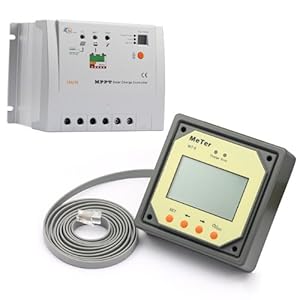
     for charge controllers look for MPPT Feature, EPSOLAR has newest Tracer series MPPT charge controller  , it can harvest more power from PV modules and increase charging efficiency compared to conventional PWM charge controllers. The MeTer Sold seperately.

    The MeTer displays the following value:
     - PV's Voltage
     - Battery Voltage (percentage and current)
     - Load Value  (current)
     - Timer Settings (timer1, timer2 functions)
    Cat-5 straight cable link to the inteface
     
    If your planning to buy charge controller etc.. do visit Paolo's Team
    http://www.bluesolara.com/
    Landline: 668-4217 | Globe: 09173097400  | Sun: 09328920500


    Battery - Use Deep Cycle Battery, Longer discharge period and a lower discharge rate.
     
    Remember to change your Charge Contoller settings to what type of battery is installed on your system (sealed lead acid battery, Gel Battery, Flooded Battery)
     
     
    The Tilt!

    The tilt formula for optimum tilt angle is your latitude minus 10 degrees. Facing SOUTH! (feng shui compass reading.htm)


    The pure sine inverter, which is also referred to as a "true" sine wave, utilizes sine wave in order to provide your appliances with power

    The modified sine inverter is different from a pure sine power inverter because the wave is in more of a step wave and because appliances are not specifically designed to work with this type of inverter. Although many appliances will still work with a modified sine inverter, some may not work as efficiently.

    Using fluorescent lighting can be problematic when using modified sine power inverters. For example, they may not get as bright and some may make buzzing noises when on. Certain appliances with digital clocks or electronic timers may also work improperly with this type of inverter because the waves are rougher and cause extra "noise" to be created in the line.

     
    Some inverter package includes Battery clip with wire, Use Pure Sine Wave Inverter! 
     
     
    Optional Gadgets
     
    Inline power analyzer - You'll need an Inline power analyzer incase you dont have EPSolar MeTER, look for features like low voltage disconnect.


    Omni Watt Meter provide real time records of the appliance's operations,provides analysis on real time running power.

    OMNI mini digital power reader (wattmeter)Functions Include:
    a. AV - ac voltage (range: 160-250v)
    b. EC - energy consumption (range: 0.0001-999.9kwh)
    c. PC - power cost (range: 0-9,999)
    d. PW - power in watts (1-3000w)
    e. RT - ratio of operation condition (range:0-100%)
     
    If you already have EPSolar MeTER i think you don't need to buy this. If you want to monitor each appliance then you need one. [ Purchase watt Meter?] 


    Remember:
    • First connect the batteries then the PV to your charge controller
    • Be sure to have an inline fuse, ATC blade type fuse will do.
    • Check the terminal's polarity before powering up the system.
    • Sunscreen :)
     
     
    In the end, the cost and performance of your system will depend not only on the panels you use, but also your solar inverter, and the orientation of your home’s roof and tilt angle of your panels.
     

    Let me know if need help on setting up the system. Thanks for reading my blog feel free to comment.

    Carl


    External Source:
    http://www.greenworldinvestor.com/2011/04/17/efficiency-of-solar-cells-made-of-siliconmonocrystallinemulticrystalline-thin-film-cigscisasicdtecztsmultijunction/
     
    http://www.epsolarpv.com/en/index.php/News/ns_content/id/49/am_id/105

    http://www.ecodirect.com/Charge-Controller-Comparison-s/251.htm

    http://www.mrsolar.com/content/pv_tilt_angle.php

    http://www.motolite.com/battery.php?id=16

    http://www.rcgroups.com/forums/showthread.php?t=1392533
     
    http://www.motolite.com/order.php
     
    http://www.theinverterstore.com/pure-sine-wave-inverter.html
     
    http://www.powerwerx.com/digital-meters/watts-up-meter-dc-inline.html

    Saturday, July 24, 2010

    Do not use the same password for everything

    An attendee of a training program for a new software package to set up login accounts mentioned using the same password for everything to make it easy to remember. As a security professional, I said that this was a bad idea because, if the password was disclosed, the "bad guy" would have the keys to all their information. The attendee scoffed and told me it did not matter because the password was a word from a foreign language. The person then sat down to create his account on the computer that was attached to the overhead projector. He typed his password into a non-masked field, exposing it to everyone in the room. My security advice was proven true.

    security awareness tip from SANS, July 25 2010

    Monday, May 3, 2010

    Be careful with cybercafe computers

    Cybercafe's offer a convenient way to use a networked computer when you are away from home or office. But be careful. It's impossible for an ordinary user to tell what the state of their security might be.

    Since anyone can use them for anything, they have probably been exposed to

    • viruses
    • worms
    • Trojans
    • keyloggers
    • and other nasty malware.

    Should you use them at all? They're okay for casual web browsing, but they're NOT okay for connecting to your email, which may contain personal information; to any secure system, like the network or server at your office, bank or credit union; or for shopping online.

    source: Sans.org  (click here for more

    Thursday, April 9, 2009

    Press the update button gently (Antivirus 101)

    Hi Guy's I just received a lot of emails asking for what’s the best anti virus (AV) for Windows?


    Juan De L Cruz doesn’t need a memory sucker AV’s.. hehe You need a real-time protection. Some AV's known to use quite a bit of memory.
    (twit twiit: “dude.. badtrip ang bagal ng pc ko”)
    Some av’s contribute to high utilization of cpu process en memory usage. ikaw Badtrip ka rin ba ;(


    Some AV offers heuristic scanning… heuristic approaches implement rule-based systems. This means, that the component of the heuristic engine that conducts the analysis (the analyser) extracts certain rules from a file and this rules will be compared against a set of rule for malicious code. If there matches a rule, an alarm can be triggered. 

    Do We Need Heuristics? 
    Having offered a brief overview of heuristic approaches and components of heuristic engines, we want to look more closely at why heuristic approaches are useful for both the user and the AV companies. In the last couple of years we have seen a couple of outbreaks (W97M/Melissa, VBS/Loveletter, W32/Nimda, … just to name a few) that have illustrated how the need for protective solutions based on heuristic approaches in general have became more urgent. Additionally, we have seen a lot of malicious code that simply copies known ideas. As a result, this kind of malicious code offers perfect attack points for heuristic engines. When heuristic engines and generic approaches are capable of detecting slight variants of known malware, the AV research labs can look at other problems and optimize their time handling.


    AV's installation--process--completed--successfully---> (click finish)
    O' right! the "default" values are set on right!! Proactive users like "us" do fine tune or tweak those additional features like heuristic scanning. Rootkit Scanning, product updates, Logging reports,  Scan files all files when reading and writing options and password protection for av’s configuration.  it's all said.


    I recommend: Kaspersky Anti-Virus 2009

    Kaspersky Lab has proven expertise in protecting against viruses, Internet worms, email worms, Trojans and other malicious programs. Rapid response to the newest threats 
    Highest virus and spyware detection rates Accurate and thorough antivirus scanning 
    Easy installation and configuration 

    Kaspersky Anti-Virus combines traditional antivirus defense methods with the latest proactive technologies to provide solid and dependable protection against malicious programs. This award-winning antivirus software includes protection against viruses, spyware, Trojans, worms and keyloggers and features our automated hourly updates. 

    The download is for a free 30 day trial.

    download link: http://esd.element5.com/demoreg.html?productid=300299803


    Hooyah! Since you’re an avid reader of my Blog here’s another security tip. Get yo’r strawberry flavored ice cream and read on...

    Carlito’s Tip#1: OpenDNS | Protect your network using the mighty octets form OpenDNS. Yo' a free service!!! That make your network safer, more secure, and more reliable.

    Website: http://carldelara.blogspot.com/2009/02/make-your-network-safer-faster-smarter.html


    Carlito’s Tip#2: OSI Layer 2 and Layer 3 Router Protection for Conficker
    Website: http://carldelara.blogspot.com/2009/01/how-to-remove-or-block-conficker-worm.html


    Open dns offers detailed statistics empower you to understand your network traffic and spot trends before they become problems. Also content-filtering like c*nficker.
    If you want to use a lower resources antivirus you can use Avira’s Anti-vir. as i said earlier make sure to fine tune and tick those necessary check boxes after the installation procedure.


    Related Info & Links:
    http://www.securityfocus.com/infocus/1542
    http://www.opendns.com/
    http://www.kaspersky.com/

     
    Kaspersky Philippines
    G/F Bldg. F Phoenix Sun Business Park, Libis, Quezon City 1201, MNL 
    p: 4384908 f: 9127256 
    http://www.isn.com.ph

     buy online: http://www.sulit.com.ph/index.php/classifieds+directory/q/kaspersky

    Hello to my entire classmate’s at Ethical Hacking and Computer Forensic.
    posted by your Network Security friend, Carl

    Saturday, March 14, 2009

    Everything USB. (soon)


    soon on my blog..

    Unknown alien, fly, moth!?


     i saw this creature lastnight at 16th floor around 3:02 AM, anyone who knows the name of this creature lemme know. Thanks!

    Monday, February 23, 2009

    2009 Threat Predictions

    http://www.avertlabs.com/research/blog/index.php/2009/01/20/the-mcafee-2009-threat-predictions/

    Make your network safer, faster, smarter, and more reliable.

    OpenDNS joins forces with leading antivirus company to combat most widely-spread Windows worm (conficker,downadup,kido...etc); Leverages global DNS infrastructure to fight malware. 

    OPEN DNS
    http://www.opendns.com


    OpenDNS is a safer, faster, smarter and more reliable way to
    navigate the Internet. You use DNS every time you use the Internet. The speed of your DNS service determines how
    quickly websites load for you. That’s why you want your DNS service to be blazing. OpenDNS protects you from phishing — bad websites trying to steal your personal
    information.

    Set DNS server addresses:
      208.67.222.222 (Primary)
      208.67.220.220 (Secondary)

     
    step-by-step instruction:
    windows user: http://www.opendns.com/start/windows.php
    yoohnicks usr: http://www.opendns.com/start/unix.php
    homerouter: http://www.opendns.com/start/home_network.php

    OPENDNS Website: http://www.opendns.com


    There’s no fee, no software to install, you don’t give them any information about yourself, and you don’t have to do anything different once you change your router’s DNS server addresses.


    • Never open an email attachment unless you know what it is--even if it's from someone you know and trust. Always remain vigilant and NEVER open a suspicious attachment.
    • Turn on your Windows firewall!!!
    • There's a Free online service form Symantec "The Security Check Scan"

                   link ==  (http://security.symantec.com/sscv6/WelcomePage.asp) 


    Goodnight Everyone! ~ carl


    Saturday, February 14, 2009

    Force Gmail to Use a Secure Connection

    You can use Google's web mail service through an unsecured connection (an http:// address) or a secure connection (an https:// address). When your out in the open browsing the Web on an untrusted network (such as an Internet cafe)  you can use.

    https://mail.google.com/

    if ur using Yahoo Mail try [https://mail.yahoo.com/]


    happy hearts day everyone, goodnight! ~ carl

    Sunday, January 25, 2009

    Let me fix it!


    Good morning everyone!

    Happy Moo Year!

    Xin nian yu kuai 2009


    FRIENDSTER:

    To all my friends!??? waiting to be approved. Sorry I can't add you up all on my friendster account.  If you belong to the list below, konting pakilala naman so i can easily add you. I didnt create that account for  the purpose of paramihan ng friends on acct. hehe

      ♫ CHAM ♫  
      ♠-=!z0n=-♠  
      marie  
      Me:-)  
      0◘MisH_JunDEs◘0  
      PRINCESS ;)  
      p!NkY  
      eunice_22  
      ஜღsArZ_23ஜღ  
      marian  
      ♥ñꆆ¥♥  
      mYniE,+  
      almira  
      ♥mOnezha  
      joanne  
      sKeToY.......™  
      jEk jEk  
      julieta  
      ♥♥♥MeLiGrAcE♥♥♥  
      RyCe ClEiN  
      √Ceejhay√  
      bhing07  
      asher  
      VeRoNiCa  
      Kristine Leigh  
      darlene  
      belle  
      willy  
      sOulSheendaE  
      shy  
      ټmЗĉǻί∫ặټ  
      jakie  
      rotilyn  
      eL  
      Mixed Breed =D  
      mamerto  
      Bella  
      shaira

    Thanks for viewing my blog. Goodnight

    Saturday, January 24, 2009

    Conficker can spread thru SLR Cameras and other USB Enabled Device Drives

    If you had used your flash drive on a computer infected by conficker worm, then your flash drive/Digital Cameras will be infected too. Then when you use that infected flash drive on a computer that has Autorun enabled, the infection will automatically run and infect the new computer.


    Nowadays mobile phone can store data like how we use our favorite colored usb drive. therefore vulnerable to virus like conficker worm.. don't spread the virus!

    you can clean those gadgets by simply typing the commands. please refer to the attached image above. Questions!?

    Here's the command:

    C:\>

    C:\> attrib -h -r -s C:\autorun.inf (then press enter key)

    C:\> del C:\autorun.inf /F /Q (then press enter key)

    if you want to clean other drives just repeat the step, just change the drive letter.

    i have to clean the spilled gatorade on my floor. goodnight

    carl

    Tuesday, January 13, 2009

    How to remove or block Conficker worm infections.

    Windows worm infection accelerates... conficker variants A,B,C

    Conficker is a worm that spreads via networks and USB drives.  On usb drives it will create an Autorun.inf on your flashdrive. we can remove tha shit out.  go to command prompt (cmd) then type

    del c:\autorun.* /f/s/q/a
    del x:\autorun.* /f/s/q/a

    * where "x" is your usb drive letter.

    Now theres a 3megs of update for Windows XP (KB950582)  on which when u install this update it will resolve an issue in which AutoRun features were not correctly disabled.  download site: [http://www.microsoft.com/downloads/details.aspx?FamilyId=CC4FB38C-579B-40F7-89C4-1721D7B8DAA5&displaylang=en]


     .usb drive problem solved!  on the net side...

    Conficker "opens a random port between port 1024 and 10000 and acts like a web server." to cut this blogpost short medyo sleepy na si carl. login to your home/soho router then go to Access Restriction.  block port both TCP and UDP ranging from 1024 upto 10,000.  if u have linksys wrt.. here's how. click add edit service


    Conficker worm attempts to brute force usernames and passwords and takes advantage of Server Service vulnerability in Windows which allows for remote code execution. The worm also auto-updates itself every day from a long list of URLs so it looks like its preparing for a larger attack.

    Remember to Turn off AutoRun feature for USB drives on your machines Patch your servers and workstations by visiting Microsoft Security Bulletin MS08-067.

    Make sure your antivirus and security solution is up-to-date on the latest version and signature database.


    Here's another yummy tip: if you think/feel your infected  go to this site then download the Stinger.. yup it's free at http://vil.nai.com/vil/stinger/


    Download v10.0.0.482 [2,641,920 bytes] (01/10/2009)

    download link: [http://download.nai.com/products/mcafee-avert/stinger10000482.exe] 


    after downloading reboot your pc on safe mode then isolate it from the net/ap. then run the scan but be sure to check the necessary checkboxes.  lil' heres how 


    other related stuff:

    microsoft malware and protection center: http://blogs.technet.com/mmpc/archive/2008/11/25/more-ms08-067-exploits.aspx


    for fortimanager's: http://www.fortiguardcenter.com/reports/MS08-067-Conficker.html


    New wave of botnet attack solved. There's no place like 127.0.0.1   hehehe.. goodnight Earth. 


    ["My neck my back" photo by: E. Lee]

    Wednesday, January 7, 2009

    40 days til analog is dead. (info)

    What is the digital television transition? 

    At midnight on February 17, 2009, all full-power television stations in the United States will stop broadcasting in analog and switch to 100% digital broadcasting. Digital broadcasting promises to provide a clearer picture and more programming options and will free up airwaves for use by emergency responders.

    Monday, January 5, 2009

    some of my favorite music last 08


    Song kapag late na sa 7:05am grace period
    voodoo people o kaya "Connected" (i’m gonna get..i’m gonna get! i’m gonna get myself connected)

    Travelling south
    Broken by Jack J.

    SLEX 120km/h tune.
    smack my bitch - prodigy

    my ringtone
    modem imac start tone .. dihdat-di-di…screech..connected

    msg alert tone
    default Skype ringtone

    my Overtime song?
    Home by Daughtry

    I think is a cool song for this summer
    calabria 2007

    favorite music from the "Groove Armada" album
    "i see you baby" (fatboy slim radio edt)
    "if everybody looked the same"

    favorite wolfgang,bamboo song

    Center of the sun, lightyears


    Essential bpm for Rubiks Cube
    "teriyaki boys" ost of tokyo drft

    my bathroom song (kids dont try this at home)
    rockstar by Nickelback

    current bgsound of my friendster
    Everything

    excerpt from my old blogsite (http://carrrl.blog.friendster.com/) March.04.2008
    Jam88.3 Background sound from Eradioportal.com


    Use OpenDNS